


 Find a store
 Full site


Understanding your Monthly Bill.
MONTHLY BILL EXPLAINER.
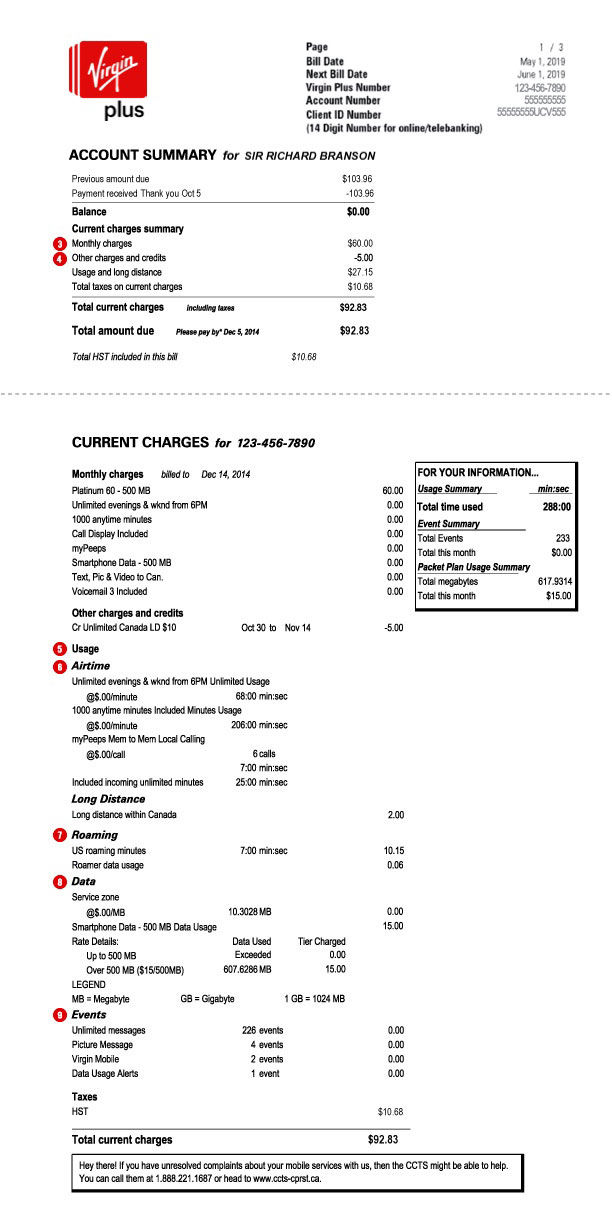
ACCOUNT SUMMARY
- Your Account Number: Use this number to register to My Account
- Your Client ID Number: Use this number for online banking and telebanking.
CURRENT CHARGES
- Monthly Charges: This section lists all the monthly charges for rate plans and features that are billed one month in advance.
- Other charges and credits: This section covers any prorated monthly charges and credits that have been put on to your account.
- Usage: Extra usage charges are added on any services you use outside of what’s included in your regular monthly rate plan and are billed for the previous month. Usage can include data, roaming overages, and charges for premium texts, calls, etc.
- Airtime: Details total minutes used. Charges will appear if usage has exceeded the minutes in your rate plan.
- Roaming: Details voice and data roaming usage outside of Canada.
- Data: Details data usage in megabytes (MB).
- Events: Details events such as text and picture messaging, ring tone purchases, game and app fees, music downloads, etc.
Billing Impacts
CHANGING YOUR MONTHLY PLAN
Any changes you make to your monthly plan will be added on your next billing date. That means the monthly charges for your new plan will replace the charges for your old plan starting with your next bill. Until then, you’ll keep using your old plan.
What you’ll see on your bill:- If there are charges related to changing your plan (like if you’ve upgraded your phone before the end of your bill cycle), they’ll show up in the “Other charges and credits” section of your next bill.
ADDING AN ADD-ON FEATURE
MONTHLY ADD-ON
A monthly add-on is a feature that stays on your account every month until you remove it. When you ask to add an add-on feature, the change goes through almost immediately and you get billed for it at the same time.
- If you add a feature in the middle of your billing cycle, your bill will show a portion of your monthly feature charge to cover the time between the day you activated your feature and your regular billing date. The charge for the next month of service for the feature (billed one month in advance).
- If you add an extra bundle in an effort to combat overage and backdate it to your months previous bill date (take that overage!), that charge will show up in Other Charges and Credits on your next bill. The charge for the next month of service will be seen in Current Charges.
30 DAY ADD-ON
A 30 Day add-on is a feature that stays on your account for 30 days only. This add-on will only be charged once on your bill, but if you add it in the middle of your billing cycle, you may see a partial charge. Check out the Add-ons page for more deets.
REMOVING A FEATURE
When you remove an add-on, it will be taken off on your next billing date. Until that date, you’ll still be able to use the add-on feature.
What you’ll see on your bill:- Your next bill won’t have a charge for this add-on anymore.
ROAMING AND TRAVELLING
If you use your phone while travelling to a country outside Canada, it’s a great idea to get an add-on for the time you’re gone. Check out our Travel Data Pass page for more deets.
What you’ll see on your bill:- If you didn’t add an add-on feature before you left or went over the limit of the add-on you got, a roaming charge will show up in the “Usage” section of your next bill, under the Roaming section.
- Voice and Text packages purchased in advance are billed like Add-ons. Check out the Add-ons page for more deets.
- Travel Data Passes purchased will show up under Events on your bill as a one-time charge for each Travel Data Pass purchased while roaming. If you haven’t hooked up with a Travel Data Pass, you won’t be able to connect to Data while roaming.
- Any pay-per-use roaming charges will show up under Usage
- Voice calls and data while roaming will show up using Coordinated Universal Time (UTC). UTC is the primary time standard by which the world regulates time
- SMS while roaming will show up in EST (Eastern Standard Time)
EXCESS USAGE
Extra usage charges are added whenever you go over whatever is included in your plan, or use something that isn’t part of your plan’s included features.
Examples include going over your:
- Minutes
- Text messages (local and international)
- Data (domestic and international)
- Music downloads
- Premuim text or short code services
What you’ll see on your bill:
- If you go over the limit of your plan or add-ons, you’ll see a charge in the “Usage” section of your monthly bill.
Good to know:
You can easily track your usage on your phone or on your computer!
UPGRADING YOUR PHONE
When you upgrade your phone the following fees might be added:
- Early Hardware Upgrade balance: if you upgrade before you’re totally eligible, or have a remaining SuperTab balance at the time of upgrade, you’ll be charged for the remaining balance for your current phone.
Related:
Still need help?


Talk to us
To purchase products or services, or to move your services, call us to speak with an agent.
Or call 1-888-999-2321


